
-
[ React Native ] React Native Calendar 커스텀Application/React Native 2026. 1. 17. 15:55반응형
React Native에서 캘린더를 구현할려고하는데
처음에는 React Native Calendar를 사용했는데 캘린더의 일정 표시를 하루는 되지만 범위가 안되어서 다른 라이브러리를 사용.
React Native Big Calendar는 일정 range표시까지 되어서 해당 라이브러리로 바꿔서 사용했다.
하지만 web에서 full calendar처럼 css로 막 바꿀 수 없어서 라이브러리의 일부를 커스텀했다.
React Native Big Calendar
우선 사용하기위해 두개의 라이브러리를 설치한다.
https://github.com/acro5piano/react-native-big-calendar
GitHub - acro5piano/react-native-big-calendar: gcal/outlook like calendar component for React Native
gcal/outlook like calendar component for React Native - acro5piano/react-native-big-calendar
github.com
npm install react-native-big-calendar
npm install date-fns
해당 라이브러리의 이벤트는
title과 start,end는 기본으로 되어있고, 다른값은 추가로 넣을 수 있다.
{
    title: 'all day event',
    start: "2021-12-24T00:00:00.000Z",
    end: "2021-12-24T00:00:00.000Z", // same date as `start`
}
여기서 start와 end는 date 타입이므로 date타입이 아닐경우에는 date타입으로 바꿔서 넣어주어야한다.
현재는 이런식으로 props를 설정했다.
데이터는 이렇식으로 되어있고, start와 end는 date 타입으로 바꿔서 넣어주었다.

<Calendar<CalendarEvent>
                events={todoEvent}
                height={calendarHeight}
                mode="month"
                theme={myTheme}
                renderHeaderForMonthView={MonthHeader}
                eventCellStyle={getEventStyle}
                calendarCellStyle={(date) => {
                    const day = date?.getDay()

                    if (day === 0) {
                        // Sunday
                        return {
                            alignItems: 'flex-start',
                        }
                    }

                    if (day === 6) {
                        // Saturday
                        return {
                            alignItems: 'flex-start',
                        }
                    }

                    return {
                        alignItems: 'flex-start',
                    }
                }}
            />
month Header props를 사용하면 달력의 헤더인 요일 표시를 커스텀 할 수 있어서
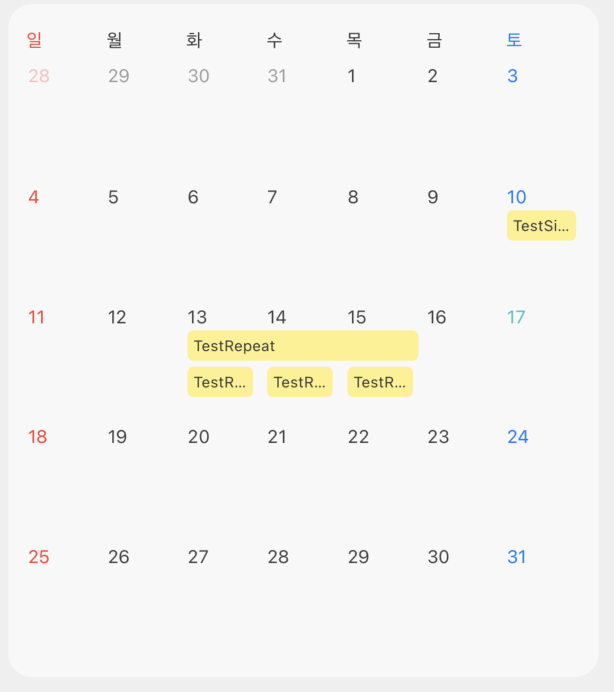
토,일 색상을 바꾸고 위치도 수정하였다.
getEventStyle은 일정 event스타일을 수정할 수 있다. 이런식으로 커스텀을 진행하였다.
event의 background는 해당 일정의 카테고리를 찾아서 해당 카테고리의 색상으로 반영해주었다.
const MonthHeader = () => {
        return (
            <View style={{ flexDirection: 'row' }}>
                {weekdays.map((day, index) => {
                    const isSunday = index === 0
                    const isSaturday = index === 6

                    return (
                        <View
                            key={day}
                            style={{
                                flex: 1,
                                alignItems: 'flex-start',
                                paddingVertical: 8,
                                paddingHorizontal: 2,
                            }}
                        >
                            <AppText
                                style={{
                                    fontSize: 12,
                                    fontWeight: '400',
                                    color: isSunday
                                        ? '#FF3B30'
                                        : isSaturday
                                            ? '#007AFF'
                                            : theme.app_theme_text_color,
                                }}
                            >
                                {day}
                            </AppText>
                        </View>
                    )
                })}
            </View>
        )
    }

    const getEventStyle = (event: CalendarEvent) => {
        const findCategory = todoStore.categories.find(category => category.id == event.category_id)
        const background = findCategory?.color
        return {
            backgroundColor: background,
            borderRadius: 4
        }
    }
하지만 요일은 props로 커스텀을 할 수 있었지만, 날짜는 커스텀 props를 찾지 못해서 결국 라이브러리에서 날짜 색상을 건드리는 부분을 찾아서 바꾸기로했다.
node_modules/react-native-big-calendar/index.js
에서 달력 cell을 렌더링 하는 부분을 찾아서
토,일 색상을 바꾸고 현재달이 아니라면 투명도를 적용시켜주었다.
var renderDateCell = function (date, index) {
        if (date && renderCustomDateForMonth) {
            return renderCustomDateForMonth(date.toDate());
        }

        // 1. 공통 변수 설정
        var isToday = (date === null || date === void 0 ? void 0 : date.format(SIMPLE_DATE_FORMAT)) === now.format(SIMPLE_DATE_FORMAT);
        var isCurrentMonth = (date === null || date === void 0 ? void 0 : date.month()) === targetDate.month();
        var day = date === null || date === void 0 ? void 0 : date.day();

        // 2. 색상 결정 로직
        var getTextColor = function () {
            if (isToday) return theme.palette.primary.main;

            if (day === 0) { // 일요일
                return isCurrentMonth ? '#FF3B30' : '#FF3B304D'; // 이번 달 아니면 30% 투명도 (HEX 뒤에 4D 추가)
            }
            if (day === 6) { // 토요일
                return isCurrentMonth ? '#007AFF' : '#007AFF4D'; // 이번 달 아니면 30% 투명도
            }

            // 평일
            return isCurrentMonth ? theme.palette.gray['800'] : theme.palette.gray['500'];
        };

        return (React__namespace.createElement(reactNative.Text, {
            style: [
                { textAlign: 'center' },
                theme.typography.sm,
                { color: getTextColor() },
                tslib.__assign({}, getCalendarCellTextStyle(date === null || date === void 0 ? void 0 : date.toDate(), index)),
            ]
        }, date && date.format('D')));
    };
이후 수정을 다하면 해당 라이브러리 수정사항을 저장한다.
npx patch-package react-native-big-calendar그럼 이런식으로 저장한 일정이 정상적으로 나오고 요일이랑 날짜 색상이 정상적으로 바뀐것을 확인할 수 있다.
 728x90반응형
'Application > React Native' 카테고리의 다른 글
[ React Native ] React Native Big Calendar 공휴일 커스텀 (0) 2026.03.14 [ React Native ] 캘린더 공휴일 데이터 API (0) 2026.03.08 [ React Native ] Bottom Sheet (0) 2025.10.19 [ React Native ] FlatList + slide card (0) 2025.10.15 [ React Native ] i18n 적용 언어변경하기 (0) 2025.10.12